Many businesses hear the term SOC as a service, but they do not always know what happens behind the scenes.
They may understand that it has something to do with security monitoring, alerts, and threat detection. But the actual working process can still feel unclear.
Does the SOC team connect to your tools?
Who reviews the alerts?
How are serious issues escalated?
What does your internal team need to do?
And how does the service improve over time?
At a simple level, SOC as a service works by connecting your security tools and systems to an external SOC team. This team monitors security activity, reviews alerts, investigates suspicious behavior, escalates serious issues, and helps your business respond faster.
The goal is not just to collect more alerts.
The goal is to turn security activity into clear action.
In this blog, we will break down how SOC as a service works step by step, so business and IT teams can understand what to expect before they start.
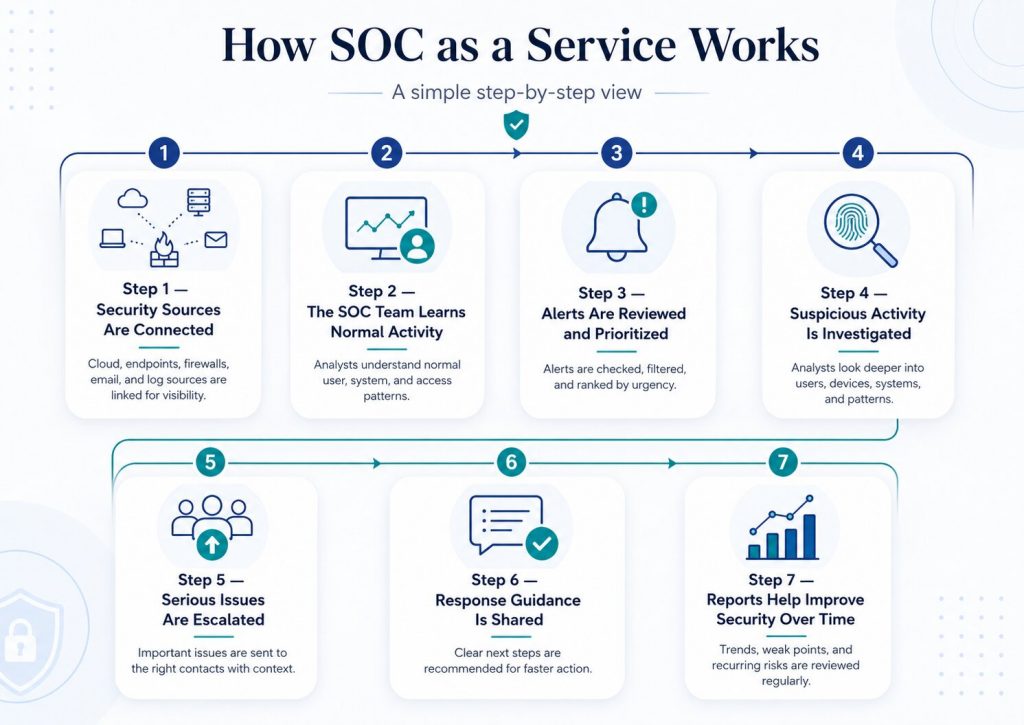
Step 1: Security Sources Are Connected
The first step in SOC as a service is connecting the right security sources to the SOC team.
This may include cloud platforms, endpoint devices, firewalls, login systems, email security tools, SIEM platforms, and business-critical applications.
The goal is to give the SOC team visibility into the systems where suspicious activity may appear.
At this stage, the focus is not on changing everything. It is about making sure the right alerts, logs, and security signals can be seen and monitored properly.
Step 2: The SOC Team Learns Normal Activity
Once the sources are connected, the SOC team starts understanding what normal activity looks like for your business.
Every company has different patterns. Some users log in late. Some teams work from different locations. Some systems see heavy activity during specific hours.
In SOC as a service, this context matters because not every unusual event is dangerous.
By learning normal behavior, the SOC team can reduce noise, avoid unnecessary escalations, and focus more clearly on activity that may need investigation.
Step 3: Alerts Are Reviewed and Prioritized
After normal activity is understood, the SOC team starts reviewing alerts more carefully.
In SOC as a service, alerts are not treated equally. The team checks where the alert came from, which user or system was involved, when it happened, and whether it matches a risky pattern.
Some alerts may be low priority. Some may need more investigation. A few may require quick action.
This prioritization helps the business avoid panic and focus attention on the alerts that matter most.
Step 4: Suspicious Activity Is Investigated
Once an alert looks important, the SOC team investigates it further.
In SOC as a service, investigation means looking beyond the first warning. The team checks the user, device, system, location, time, and related activity around the alert.
For example, a login from a new location may not be serious alone. But if it is followed by unusual file access or repeated failed attempts, it needs closer attention.
This step helps confirm whether the alert is harmless, suspicious, or a real threat.
Step 5: Serious Issues Are Escalated
When the SOC team confirms that an alert needs action, the issue is escalated to the right people.
In SOC as a service, escalation should be clear. The business should know who gets notified, what details are shared, and how urgent the issue is.
A good escalation does not simply say, “Something is wrong.”
It should explain what happened, which system or user is affected, why it matters, and what action may be needed next.
This helps the internal team respond faster without confusion.
Step 6: Response Guidance Is Shared
After escalation, the SOC team shares practical response guidance.
In SOC as a service, this may include steps such as disabling a suspicious account, resetting credentials, blocking access, checking an affected device, reviewing cloud permissions, or watching for repeated activity.
The goal is to help the business act quickly and correctly.
This is important because many teams lose time deciding what to do after a serious alert. Clear guidance helps reduce delay and gives the internal team a better path to contain the issue.
Step 7: Reports Help Improve Security Over Time
The final step in SOC as a service is reporting and improvement.
The SOC team does not only review alerts one by one. Over time, it can identify repeated patterns, weak areas, risky user behavior, common misconfigurations, and systems that need closer monitoring.
These reports help the business understand what is happening across its security environment.
They also help teams improve response steps, reduce repeated issues, and make better security decisions.
This is how SOC as a service becomes more useful over time.
SOC as a service is not just about watching alerts. It is about turning security signals into clear decisions, faster response, and continuous improvement.
SOCRoom helps businesses use SOC as a service to monitor security activity, investigate threats, escalate serious alerts, and improve response over time.
If your business wants better security visibility without building a full internal SOC, SOCRoom can help you move from scattered alerts to clear security action. Connect with us